Occasional witterings…
07 Jun 2017
The first in an occasional series looking at the tools we use in our day-to-day work
A lot has been said, written, and ranted, about programming editors and IDEs over the years. Allow us to add to the noise.
Mr. Poole is kicking off with a brief post about his code editor of choice, Atom…
If you haven’t yet ventured into the world of this “hackable text editor for the 21st century” (their words), then it might be worth a go. Atom is an extremely usable, responsive, and distraction-free editor for code, and I’ve used it to the exclusion of all others for my text editing, JavaScript / web coding, bash scripting, and even the odd bit of Java (IntelliJ IDEA is still my IDE of choice for more heavyweight Java programming and testing).
Why Atom? Well yes it’s open-source, free of cost, and has a massive developer-friendly organisation behind it. That’s a cracking start, but the fact that Atom is built on top of tried-n-tested web technology (Electron) is the real clincher. If you don’t like something in the editor, all it takes is Ctrl-Shift-i (Windows) or Cmd-Opt-i (Mac) and you will have a familiar inspection pane at your disposal, a means for tweaking whatever it is that gets on your pip.
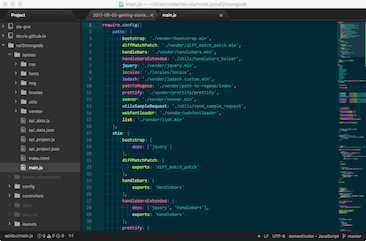
Atom ships with a number of key packages, not least the very wonderful Autocomplete-plus, and there are hundreds more to choose from. Minimap is a must for navigating larger files, and the various Linter packages are indispensable too. Here are a few others I recommend:
- Semantic Colo(ur) for sensible syntax colouring
- atom-ternjs: “JavaScript code intelligence” which sits on top of the core Autocomplete-plus package
- linter-eslint fronts up ESLint for Atom and Linter.
- Todo-show Shows up all
TODO, FIXME and related tasks in a project or whole workspace.
We don’t all agree about programming editors at LDC Via Towers: what are your favourites?
02 Jun 2017
A reflective post on a warm Friday afternoon
As new projects get underway and existing code is refreshed, refined and refuted at LDC Towers, the idea of “getting started” — together with the associated procrastination such as Googling, reading the news, making coffee and so on — is often uppermost in one’s mind.
Last month Ben wrote a post entitled Time well spent, which covered the movement of the same name (Now Center for Humane Technology). We’d like to continue examining this theme (there’s stuff to do you see): how do you get going? What tricks do you have for embarking upon new work? The task can often seem insurmountable, especially in this online age.
Fundamentally of course the solution is simple: the best thing to do is just start. Take steps, and before you know it, you’ve got somewhere. This is covered in the blog post Starting with failure is good for creativity, as long as you get started, which is well worth a read, and examines Kevin Ashton’s essay, How to Fly a Horse. We especially like this bit from the essay:
Good writing is bad writing well edited; a good hypothesis is whatever is left after many experiments fail; good cooking is the result of choosing, chopping, skinning, shelling, and reducing; a great movie has as much to do with what ends up on the cutting room floor as what does not.
… it echoes that maxim from the late Steve Jobs:
Real artists ship
Don’t try to make things perfect (that’s our excuse and we’re sticking to it): just make things.
23 May 2017
As some of us know, managers love a good spreadsheet. And G Suite Sheets is a very capable offering in this space. With a lot of organisations going down the Google path, we thought it might be fun to have little play with G Suite and LDC Via working in tandem.
G Suite makes use of Apps Script to provide the equivalent of MS Office macros. You can add code to Google Docs, Sheets, Forms, Slides and more. Whilst the code can make use of optional “triggers”, when it comes to Google Sheets, you can actually reference functions written in apps script directly within your spreadsheet formula.
For example, if I write a function called someFunctionOrOther() in the script editor, I can make use of this function in my spreadsheet simply by referencing it in a standard cell formula: =someFunctionOrOther. Easy eh? So let’s use it with LDC Via. Via provides a comprehensive REST API, and you can consume such APIs in apps script. We have an activity API in Via which provides simple stats (number of audit log items) for each database that the current user account has access to. Let’s pull this data into a spreadsheet, and then we can analyse it further.
Here’s some sample apps script to consume the activity API:
function getViaDbActivity() {
  // Set this to your key
  var apikey = "<API KEY>";

  // Via API endpoint for database activity
  var url = "https://eu.ldcvia.com/1.0/activity";

  // Request options: note the headers object
  var options = {
    'method' : 'get',
    'contentType' : 'application/json',
    'headers' : { 'apikey': apikey }
  };

  // Perform the request
  var response = UrlFetchApp.fetch(url, options);
  var data = JSON.parse(response.getContentText());

  // Iterate response JSON and pass data back
  var array = [];
  Object.keys(data).forEach(function(db, index) {
    var numberOfLogs = data[db];
    array.push([db, numberOfLogs]);
  });

  return array;
}
The function returns an array which is automatically parsed into rows and columns when a single cell references the function.
Note how we’ve then fired up the G Suite “Explore” function which lets us start to make sense of our data.
Nifty eh? And oh so simple!
16 May 2017
Now that the dust has settled after Engage, it’s back to work, and time to address a few things that often come up when we exhibit at conferences.
When we embarked upon the LDC Via platform, we made a conscious design decision about application logic, and more specifically, application code (agents, script libraries, form events and so forth). We do not attempt to convert any of these constructs when we migrate content from a Domino database to our platform.
Why?
-
I don’t write JavaScript like I write LotusScript. Do you?
Languages have moved on (capabilities, syntax, patterns): what works for VB6-style Lotusscript looks odd in 21st century Java or JavaScript.
-
How can you take advantage of the good new stuff if you convert your old business logic the old-fashioned way? What about modern language constructs like lambdas and promises?
-
There is no magic bullet: can you really convert code and logic from Domino without intervening?
-
Do you want to translate this code? It may well be redundant, or you may want to take advantage of moving your app to have a bit of a tidy-up. For example, why not shift all those form events to one central location? Get rid of those pesky myriad button clicks and bind them to a page in one fell swoop… Who wants cruft in their shiny new app?
-
Code might be locked to the platform and no longer really apply. For example, custom dialogue boxes and UI classes in the Notes client.
-
Auto-translated code could be prone to errors.
-
Good LotusScript is strongly-typed, JavaScript is not.
-
Do you actually understand the business logic behind the legacy codebase? It’s entirely possible that no one does. Do you want to migrate an application “lock, stock and barrel” without knowing how it actually works?
All well and good, but what is the best approach for migrating your Domino databases? Given that you’re already migrating all of your data, now would be a good time to re-validate the business logic behind your application.
Have the best of both worlds: improve your application’s workflow sure, but now is the time to improve the quality of your code, beef up your test coverage, and so on.
Needless to say, we can help you every step of the way: we’ve got plenty of experience in this space.
10 May 2017
Theo does such an amazing job organising this event every year that it gets difficult to work out what to praise most. As ever, the venue was magnificent, as were the sessions, speakers, sponsors, number of attendees. It’s nice to be able to go to an event that is so reliably well run.
 For LDC Via, this was our third year as a sponsor, and our best yet. We had some really great conversations with people. Speed sponsoring, especially, was a highlight. Normally there’s a gradual drop off in the number of people doing each iteration of the presentation, but a remarkable number stayed until the end. Poor old Ben deserved the beers that were constantly in hand while he did the presentation 23 times!
Another great thing was the number of new attendees for the event. We had a similarly large number of new faces come and visit the stand. So remember, if you have any questions about LDC Via, please do contact us.
Otherwise, we’re already looking forward to the 2018 version of Engage, wherever it may be.